By Mehedi Hasan Robiul (TechRovix)
Last Updated: November 1, 2026
Affiliate Disclaimer
This article contains affiliate links. As an Amazon Associate, I earn from qualifying purchases. If you click on any links on this page, TechRovix may receive a small commission at no extra cost to you.
A standing desk can offer more flexibility but can cause a mess with all the cables, power strips, and laptop adapters. An appropriate cable tray can help keep things tidy.
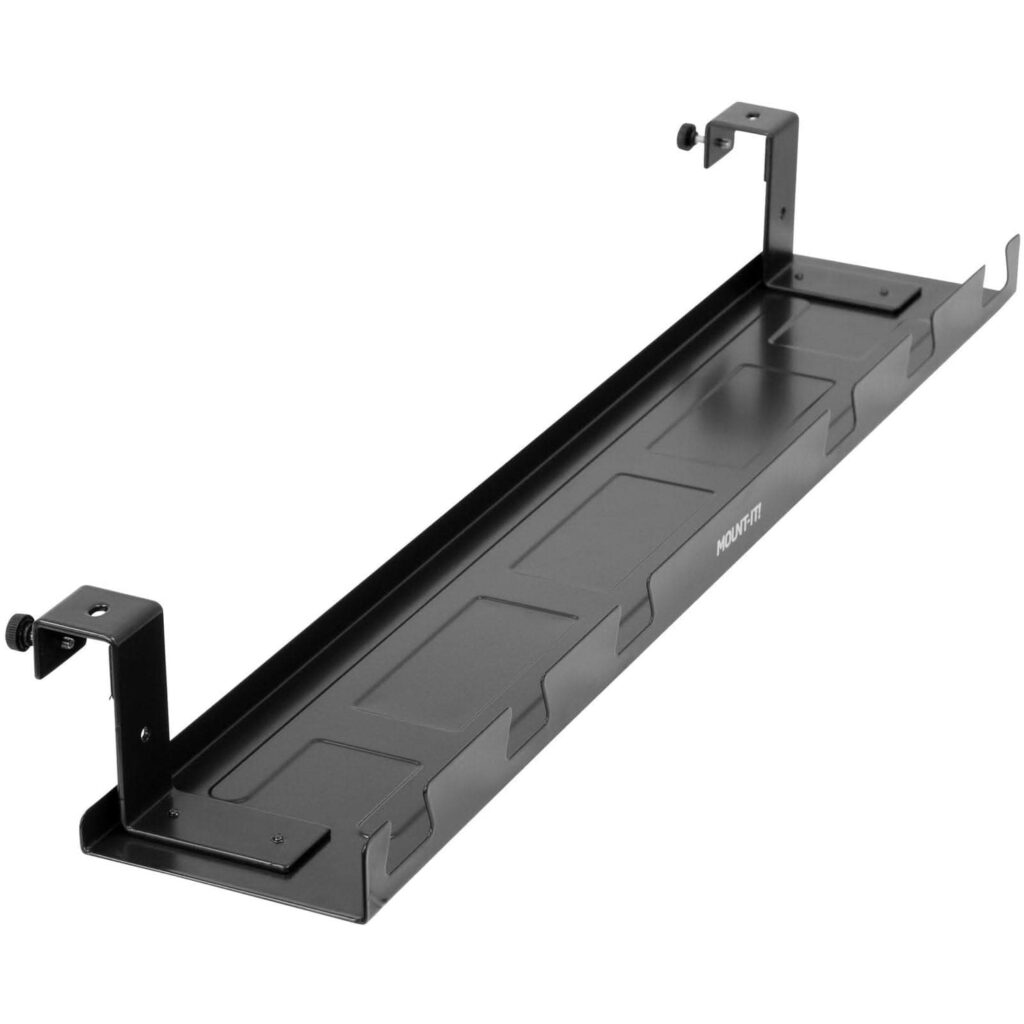
The Mount-It! MI-7282 is a steel cable tray that can be installed either using the hooks onto a compatible standing desk frame or crossbar. (30 Words) It is 23.2" long and can support up to 6.6 lbs of weight, so it could be a good choice.
Will it fit your standing desk? How many items can it hold? Is it a better option than VIVO or IKEA?
This guide takes a look at the specifications, installation instructions, customer reviews, and alternatives to help you make your decision. This guide is research-based and not hands-on testing.
Quick Verdict: Is this the right cable tray for my desk?
If you have a standing desk with a compatible crossbar and your items do not exceed 6.6lbs, this could be a good option.
The key word here is compatible. It is not guaranteed to fit your crossbar. You will need to check the shape, space, position of hooks, and space underneath your desk.
Best For:
Standing desks with a compatible frame or crossbar. Keeping your power strip, laptop charger, and smaller adapters organized. If you like having a steel cable tray with open ends and cutouts. If you want to install it using screws underneath your desktop.
Not Ideal For:
No compatible crossbar and don’t want to drill. If you need a higher weight capacity. If you like having a clamp-on tray. Power adapters are too heavy for the tray, which is 4.2" wide and 2.9" tall.
Affiliate link. As an Amazon Associate, I earn from qualifying purchases.
Mount-It! MI-7282 Key Specifications
This high-grade steel cable tray is great for keeping your power strips, chargers, and cables organized underneath your desk. It has cutouts and open ends to help route your cables.
| Specification | Mount-It! MI-7282 |
|---|---|
| Model: | MI-7282 |
| Material: | High-grade steel |
| Length: | 23.2" |
| Width: | 4.2" |
| Height: | 2.9" |
| Weight Capacity: | 6.6 lbs |
| Install Options: | Hooks onto desk frame/crossbar or screws. |
| Cable Routing: | Multiple cutouts and open ends. |
These are the specifications provided by the manufacturer. Compatibility will depend on your desk frame, install space, and the size of your items.
How does the MI-7282 crossbar installation work?
One of the main reasons people may consider this tray is because it can be installed using the hooks.
Rather than installing underneath the desktop, the tray can be fitted with the hooks provided and hung onto a compatible desk frame or crossbar. (30 Words) This will hang underneath your desk.
This can be useful if you have a standing desk with a suitable frame.
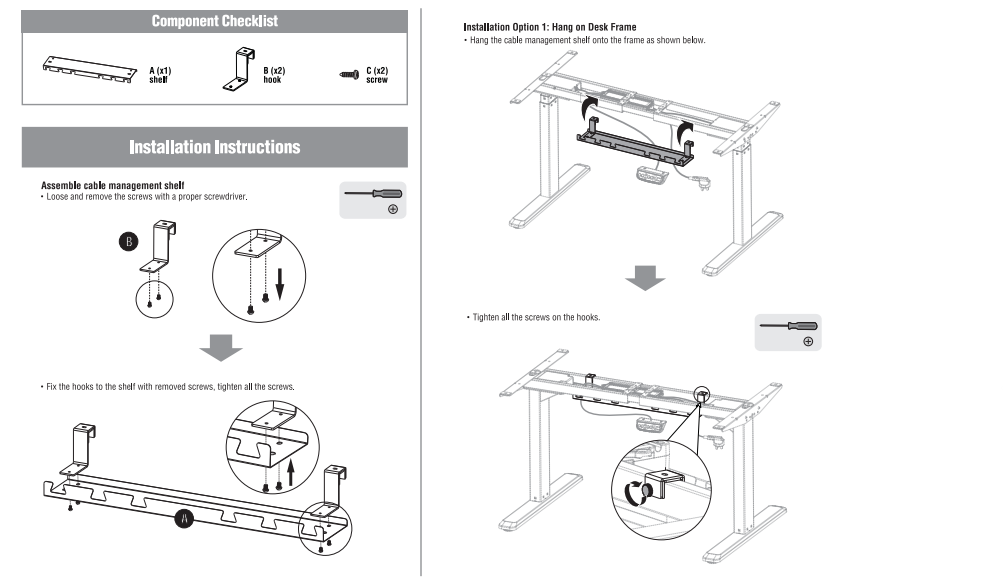
However, do not assume that all crossbars are suitable. The frames can vary in size, shape, position, and space. Check the shape of your frame against the hooks on the tray.
Crossbar Compatibility Checklist
Before purchasing, check the following:
- Is there enough space underneath your desktop?
- Does the shape of the frame allow the hooks to fit securely?
- Will the tray cause any issues with the frame, motor, moving parts, or other items?
- Will your cables move safely when raising/lowering your desk?
- Is 23.2" long suitable for your space?
If you cannot confirm the measurements, contact the manufacturer/seller.
Can I install the MI-7282 using screws underneath my desk?
Yes. The MI-7282 can be installed using screws underneath your desktop.
As mentioned in the installation instructions, the tray can be fitted with hooks to hang onto the frame. However, it can also be installed by marking out where you would like to install it and creating the necessary holes. Fix the tray underneath your desktop using screws.
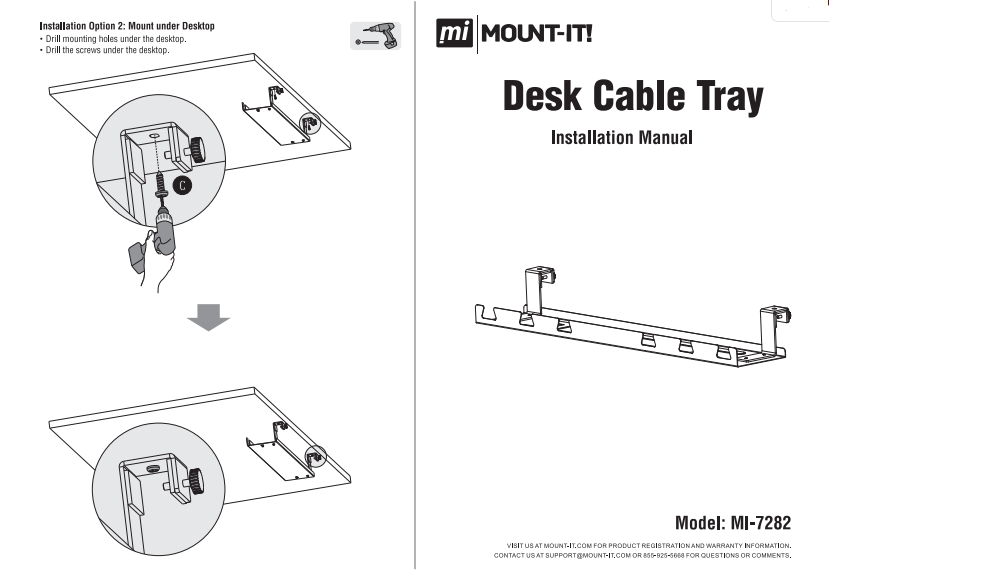
Before drilling, check what material your desktop is made from, how thick it is, and if there is enough space underneath. Do not drill into any cables, electrical components, or mechanisms. If unsure, contact the manufacturer of your desk.
Weight Capacity
The tray can hold up to 6.6 lbs. This may be enough for a basic cable tray, but you need to ensure that your items do not exceed the weight capacity.
For example:
| Item | Weight |
|---|---|
| Power strip | ~1.2 lbs |
| Laptop charger | ~1.0 lbs |
| 2 x USB Adapters | ~0.5 lbs |
| Total | ~2.7 lbs |
This would be around 2.7 lbs,s, which is below the 6.6 lbs.
These are just examples. Your power strip, charger, and adapters may weigh more/less. Weigh your items.
Also consider how much weight you are putting on one end. Don’t overload the cables and don’t try to put too much weight on them. Follow the manufacturer’s installation instructions and weight capacity.
Simple Weight Check
- Weigh each item.
- Add up the weight.
- Include the power strip and any items you will be putting inside.
- Ensure you do not exceed the manufacturer’s weight capacity.
- Place heavier items securely and evenly.
This will help to ensure you don’t choose a tray that is too small for your items.
MI-7282 vs. VIVO vs. IKEA SIGNUM
There are other options available. The options below have different installation methods, sizes, and weight capacities.
| Feature | Mount-It! MI-7282 | VIVO DESK-AC06-1C | IKEA SIGNUM |
|---|---|---|---|
| Type | Steel Cable Tray | Steel Cable Tray | Steel Cable Management Trunk |
| Length | 23.2" | 16.5" | 70 cm/27.6" |
| Width | 4.2" | 3" | 16cm/6.3" |
| Height: | 2.9" | 4.5" | N/A |
| Weight Capacity: | 6.6 lbs, | 11 lbs, | 10 kg. |
| Install Type: | Crossbar Hooks or Screws. | ||
| Best Features: | Crossbar hooks, | higher weight capacity, | larger cable management trunk. |
These are based on the information provided. Check the exact model and local listing.
Mount-It! MI-7282 vs. VIVO DESK-AC06-1C
This is a longer tray than the VIVO option. It can be installed using the crossbar hooks or screws.
The VIVO has a higher weight capacity of 11 lbs. If weight capacity is a key factor, then this may be a better option.
However, this is a screw-in tray and does not have the crossbar hook installation.
If you have a compatible crossbar and the weight capacity is suitable for your needs, choose the MI-7282.
If you prefer to install using screws and want a higher weight capacity, choose the VIVO DESK-AC06-1C.
Mount-It! MI-7282 vs IKEA SIGNUM
The IKEA SIGNUM is a larger cable management trunk. It is 70cm long and 16cm wide. It has a weight capacity of 10 kg.
This is a larger tray with a higher weight capacity than the MI-7282. The MI-7282 is smaller but has a crossbar hook installation. The two products have different designs.
If you want to install using the crossbar or screws and the size is suitable, choose the MI-7282.
If you need a larger cable management area and the installation method is compatible with your desk, choose the IKEA SIGNUM.
Screw vs Clamp Install
Not all cable trays will install the same. The installation could be just as important as the size.
| Install Type | Description | Key Consideration |
|---|---|---|
| Crossbar Hooks | Can be hung onto a compatible frame. | Must have a compatible frame and space. |
| Screws: | Can be installed underneath your desktop. | Must have a compatible material and drilling. |
| Clamp: | Can be clamped onto the edge of your desk. | Must have a compatible thickness and space. |
This can be installed using the crossbar/hooks or screws. It cannot be clamped.
If you want a no-drill clamp option, look at a product designed for this. An example would be the VIVO DESK-CM6L-B. Check the clamping range and thickness of your desk.
Large Laptop Charger
The weight capacity will not tell you if your items will fit inside.
The tray is 4.2" wide and 2.9" tall. This may not be suitable for large laptop power bricks.
Before purchasing, check:
- Length, width, and height of your largest adapter.
- Space for cable connections.
- Space to remove/replace your adapter.
- Total weight of your items.
- Space for cables to bend.
Do not force large power bricks into the tray, and ensure you don’t block any ventilation. Follow the manufacturer’s instructions for your items.
Will the MI-7282 prevent my tray from bending?
The tray has a weight capacity of 6.6 lbs. It is important to not exceed this, but this does not guarantee it will not bend, move, or sag.
The installation, compatibility, weight distribution, and cable tension can all play a part.
To reduce any excess stress:
- Ensure weight does not exceed the weight capacity.
- Evenly distribute your items.
- Secure loose cables.
- Don’t hang heavy items from the cable holes.
- Ensure hooks/screws are installed correctly.
- When adjusting your standing desk, check that the cables are not too loose.
If your tray is not fitting securely or looks like it is bending, take the weight off and check your installation.
What do the customer reviews suggest?
We were unable to check the current rating, number of reviews, and full reviews for the exact product.
Some third-party retailers and product data mirrors have summary reviews for this product. The reviews mention positive comments about the steel build, installation, and cable storage. Some negative comments mention issues with large adapters, fitting, and possibly bending.
These should be taken with caution, as they are not an audit of the current Amazon reviews.
We found an official demonstration from the manufacturer. This will not be an independent review.
As a result, this guide will focus on the published information.
Pros & Cons
Pros
- Can be installed using crossbar/hooks or screws.
- Steel build.
- 23.2 inches long, so it can fit most items.
- Cutouts and open ends to help route cables.
- Check the size and weight capacity, as the manufacturer provides the specifications.
Cons
- Lower weight capacity of 6.6 lbs.
- Crossbar compatibility depends on the shape and space of your frame.
- 4.2" wide may not be suitable for large power adapters.
- Requires drilling.
- Not a clamp-on tray.
Who Should Buy the Mount-It! MI-7282?
If you have a standing desk with a compatible crossbar, want a steel cable tray, and only need to organize a light selection of power items, this could be a good option. (32 Words)
It could also be a good option if you want to install using screws underneath your compatible desktop.
However, if your items are heavy, your power bricks are large or your frame is not suitable, check out other options.
FAQs
1. Can I install this on a crossbar?
Yes. The MI-7282 can be installed using the hooks onto a compatible frame or crossbar. Ensure your crossbar is compatible by checking the shape, space, and compatibility with the hooks.
2. What is the weight capacity?
Mount-It! The weight capacity is 6.6lbs. Ensure your items do not exceed this and evenly distribute your weight.
3. Can I install this using screws underneath my desk?
Yes. This can also be installed using screws underneath your desktop. Ensure your desktop is compatible.
4. What are the dimensions?
The tray is 23.2" long, 4.2" wide, and 2.9" tall.
5. Is this a clamp-on tray?
No. This can be installed using the hooks onto a compatible frame or installed using screws underneath your desktop.
6. Can I fit a large laptop charger?
It depends on the size of your charger. The tray is 4.2" wide and 2.9" tall. Measure your power brick and ensure there is enough space for the cable connections.
7. Is this compatible with all standing desks?
No. The tray depends on the frame, crossbar position, hook compatibility, and space.
Final Verdict: Check Your Desk
The Mount-It! MI-7282 has 2 useful installation options. It can be hung using the hooks onto a compatible frame or installed using screws underneath your desktop. It is made from steel, is 23.2" long, and has cutouts to help route your cables. This could be a good option for a lightweight workstation.
However, the key downside is that the weight capacity is only 6.6lbs. It is also only 4.2" wide and not all crossbars are compatible.
If you have a compatible crossbar, your items fit inside and your weight does not exceed the weight capacity, this could be a good option. (30 Words) If not, look at a higher weight capacity or clamp-on option.
Check the latest price & availability:
Affiliate link. As an Amazon Associate, I earn from qualifying purchases.
About the Author
Mehedi Hasan Robiul is a digital marketer and founder of TechRovix. He researches desk accessories, cable management products, and practical solutions to help you compare products, understand the specifications, and make an informed decision.